


Graphical auxiliary functions give live to your plant layout: By animation, you dynamically display filling level changes, transport movements of objects, or the status of active transfers. To use them, you can import our VBA macros into your INOSIM project.
Examples
The following video (15 sec.) shows a plant layout with animated graphics:
To use the animations, import the macro with the auxiliary functions to your INOSIM application:
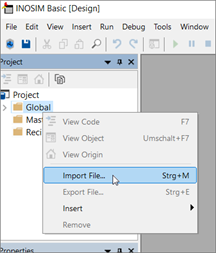
The following animations will be available for your work with INOSIM:
- Filling level of units
- Movement of objects (e.g., MUs)
- Animation of connecting lines (transfers)
A detailed guide to the graphical auxiliary functions, as well as a demo project, can be downloaded.
- Example Project
- Support files
- Detailed guide for Graphical Auxiliary Functions
More Questions?
Want to know more about this topic or have another question? Please contact us!
More Tips & Tricks
Using the new controls for Unit Pools in INOSIM 13
The control frameworks for the Unit Pool Allocation control and the Transfer to/from Unit Pool control in the new INOSIM version 13 have changed. The…
Interval Evaluation Of The Transfer Report
Interval Evaluation Of The Transfer Report In this tip, we show you how to automatically compute data via VBA with the help of INOSIM-generated reports…
Computational power from the .NET universe: Math in INOSIM rethought
Math in INOSIM rethought You need some statistical figures to evaluate the simulation results? The mean value of a dataset is easy to calculate, but…
 General Inquiries