


Our latest software version, INOSIM 2026.1, offers numerous new functions. You can look forward to new features in the Gantt chart, a new resource type and an extension of cost accounting. In addition, the object model and the Packaged Goods add-on have been expanded. You can now access the Parameters Workbook without installing Excel. At the same time, in addition to minor optimizations and bug fixes, several major enhancements have been developed and implemented. Below you can find out more about the most important new features in INOSIM 2026.1.
Your update to INOSIM 2026.1
Are you hesitant to update to a new software version? Don’t worry: your models from INOSIM 14 and 2025 can usually be used in INOSIM 2026.1 without any adjustments, allowing you to take advantage of all the new features at no additional cost or effort.
To start INOSIM 2026.1, you need an updated license. To do this, please create a license update request file and send it to our support team. If you have already received a license update from us this year, it is usually already activated for INOSIM 2026.1.
By the way: You can now also run your license server on a Linux system.
New Functions in the Gantt-Chart
Previously, a green tick next to the experiment name indicated the presence of results. Now, when you hover over the name, the date of the last successful simulation run is also displayed.
In the Gantt chart, it is now possible to highlight all associated procedures (or operations) by right-clicking on an order. In this case, all other allocation bars are displayed in desaturated colors. This makes it easier to visually track the progress of an order.
Transfer arrows in the Gantt chart can now be filtered by right-clicking on a sub-system or an allocation bar for that sub-system. This makes it easier to keep track of many transfers in complex models.
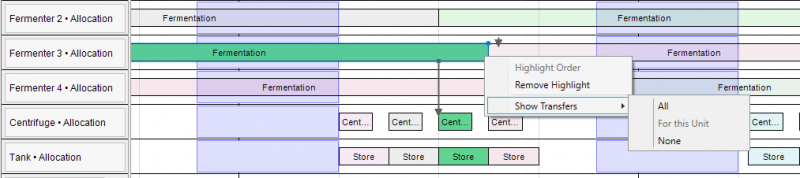
Before, labels that were longer than the corresponding bar were not displayed at all. Now, they are automatically abbreviated: depending on the available length, ‘Centrifugation’ becomes ‘Centrifug…’ or ‘Cen…’. This means that even short operations and procedures remain recognizable at all times.
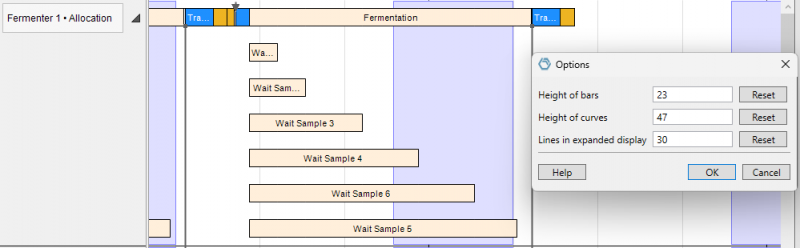
You could already customize the height of the bar rows and graph rows in the Gantt chart. In the same menu, you can now also freely configure the number of rows displayed in the expanded view; previously, this was limited to five. This allows you to display as many parallel bookings as you need. This allows you to display as many parallel bookings as you need. You can also easily reset all values to the default by clicking on the standard.
New Resource Type Consumable
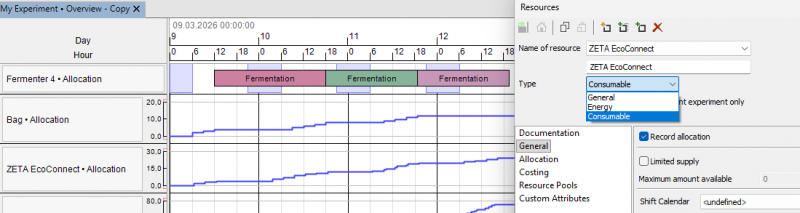
Single-use equipment is becoming increasingly important, particularly in pharmaceutical production and, of course, for INOSIM simulation models. Until now, you could use normal resources or MU objects from the Packaged Goods add-on to model the consumption of, for example, bags, filters, or aseptic connection solutions such as ZETA EcoConnect.
INOSIM 2026.1 introduces a new resource type – Consumable – in addition to the existing types General and Energy. A resource demand with a positive amount consumes consumables; a negative quantity reduces the number already consumed, for example when returning reusable parts. In the Gantt chart, the quantity already consumed is shown as a positive value. The occupancy costs for this type are calculated per item and are independent of the allocation time. With this new resource type, you can easily model the consumption of single-use equipment and immediately include it in the total cost calculation.
Costing extended to include disposal costs
In addition to allocation costs, material costs, and energy costs, the operation of production facilities also incurs costs for waste disposal. INOSIM 2026.1 therefore allows specific disposal costs to be assigned to sinks.
For example, a regular sink for uncontaminated wastewater can be assigned the cost of €10/t, while the disposal of contaminated wastewater in a special sink incurs costs of €100/t. The disposal costs are taken into account at all relevant points: in the diagnosis and in the Excel cost accounting report, as well as in the costing method of the reporting object (cost accounting report as a table object, see Tip&Trick “The Reporting Object”).
Change shift calendars via VBA and check for consistency
You are already familiar with creating shift calendar elements via code from INOSIM 2025 (see also Tip&Trick “Automated Creation of Shift Calendar Data”) What is new is that INOSIM recognizes overlaps in shift calendars and issues corresponding error messages. In our example model (see download area), a working time from 6 a.m. to 2 p.m. and a second period from 1 p.m. to 9 p.m. are defined. The simulation interprets this constellation as continuous working time from 6 a.m. to 9 p.m. and issues an error.
New functions for table objects and pools
The member list for UnitPool and ResourcePool objects now has an Exists method. This allows you to check whether a specific sub-system is a member of a pool.
Table objects, custom attributes, etc. can now also contain the DateTime data type. Previously, date values had to be converted to strings and stored as SimDate.
The custom sorting function for table objects previously presented in a tip & trick has been integrated into INOSIM 2026.1. You can now sort tables directly in ascending or descending order by any column and define the area to be sorted by specifying the first and last row. Tip: Use the FindRow or FindColumn method of a table object to find the corresponding row or column number.
If UnitPools("Fermenter Pool").Members.Exists("Fermenter 3") Then
   Console.Print "Welcome to the Pool, Fermenter 3"
End If

Dim t_report As Table
Dim sort_col As Integer, first_row As Integer
'...
sort_col = t_report.FindColumn("DisposalCost")
first_row = t_report.FindRow("Order 1")
t_report.Sort(sort_col, False, first_row)[
Packaged Goods Improvements
Since INOSIM 2025, users of the Expert Edition can use the functionalities of the Packaged Goods add-on free of charge. To simplify the creation of the associated controls, corresponding objects are now available in WinWrapBasic. Parameterization of the modules no longer requires manual entry of attributes as strings.
In addition, further search constraints have been implemented: Previously, for example, specifying the criterion “Contents” would only select MUs with exactly this quantity. Now, a comparison operator can be selected – equal, greater than, less than, greater than or equal to, or less than or equal to – or alternatively the corresponding operator symbols (=, >, <, >=, <=). More complex search conditions can still be implemented yourself using CustomSearch.
Accessing the Parameters Workbook via code without Excel
INOSIM 2025 already accessed Microsoft Excel only when opening the Parameters Workbook, meaning that you did not need to have Excel installed if you did not use the workbook. INOSIM 2026.1 now provides a new, alternative method for accessing the parameter workbook and, of course, external workbooks in .xlsx format via code (WinWrapBasic). The WorkbookXML extension does not require Excel to be installed and can be activated for your project free of charge without an additional licence (Project Properties > Extensions).
Compared to cell-by-cell writing via classic access, writing with this extension is approximately 100 times faster (in the example model, approximately 2 s compared to 0.02 s). Another advantage is that Excel does not need to be installed or licensed on the simulation system, for example on servers without logged-in users.
Further development of INOSIM Insight
In addition to our own ideas, numerous requests and suggestions from INOSIM users worldwide have been incorporated into the development of INOSIM 2026.1. The documentation has also been revised in several places and helpful details have been added. Please continue to share your ideas with us via our support team; this way, you can actively contribute to making INOSIM Insight even better.
INOSIM 2026.1 will now remind you more frequently when a new version is available so that you can benefit from new features without delay.
Downloads
In the download area (login required), you will find:
- Installation file for INOSIM 2026.1
- User documentation as PDF
- Sample model “INOSIM 2026.1 New Features”
- License setup instructions
Sie haben noch Fragen oder wünschen weitere Informationen? Bitte nehmen Sie Kontakt mit uns auf.
 General Inquiries